GSoC 2025 - Week 11 Status Update
Week 11 progress
This week I worked on training YOLOv11 to recognize traffic signs as one of the inference modes. After that, I switched to integrating gRPC communication on both client and server sides of the inference model and the Flutter App.
Traffic signs inference model
One of the Inference models to be demonstrated is the traffic signs recognition. I trained a small YOLOv11 model on the German Traffic Sign Recognition Benchmark (GTSRB) as a first step. I used the raw image traffic signs without augmenting them with additional backgrounds; augmentation could be future work to improve the detection accuracy and stability. The model was trained using Ultralytics YOLO CLI:
$ yolo train model=yolo11s.yaml data=gtsrb_yolo_dataset/data.yaml epochs=10 imgsz=320 batch=32 workers=8 name=small-obj_320After training, the model was exported as an ONNX to be consumed by the inference model
$ $ yolo export model=small-obj_320.pt format=onnx imgsz=640gRPC client
I began integrating the gRPC into the inference model and tested request calls using a Python dummy server at first.
Using the dummy server, I verified the gRPC communication from the client side by receiving a stream of
detections and switching between different models from the server side. The Coordinator protobuf service definition is
hosted in the camera_idl repository, which can be added as a submodule on both client and server side, and can host
other services for future components.
gRPC server
I integrated the gRPC server communication with the camera_streams_app, which depends on the camera_linux package .
I started with a Dart server CLI example that printed received detections in the terminal. After that, I used that
CLI server example to integrate the Coordinator server service into the camera_streams_app. Finally, I added
some UI features so the app displays information about the detected traffic sign in the upper-right corner of the
application window.
The pipeline in action
As described in the coordinator.proto protobuf file, the main RPC streamDetections is sending a stream of detected
objects detections and receiving a stream of Ack messages. The Ack mesages indicate successful receipt of the detection
message, and communicate the next action: continue streaming, switch the inference model, or to stop streaming service.
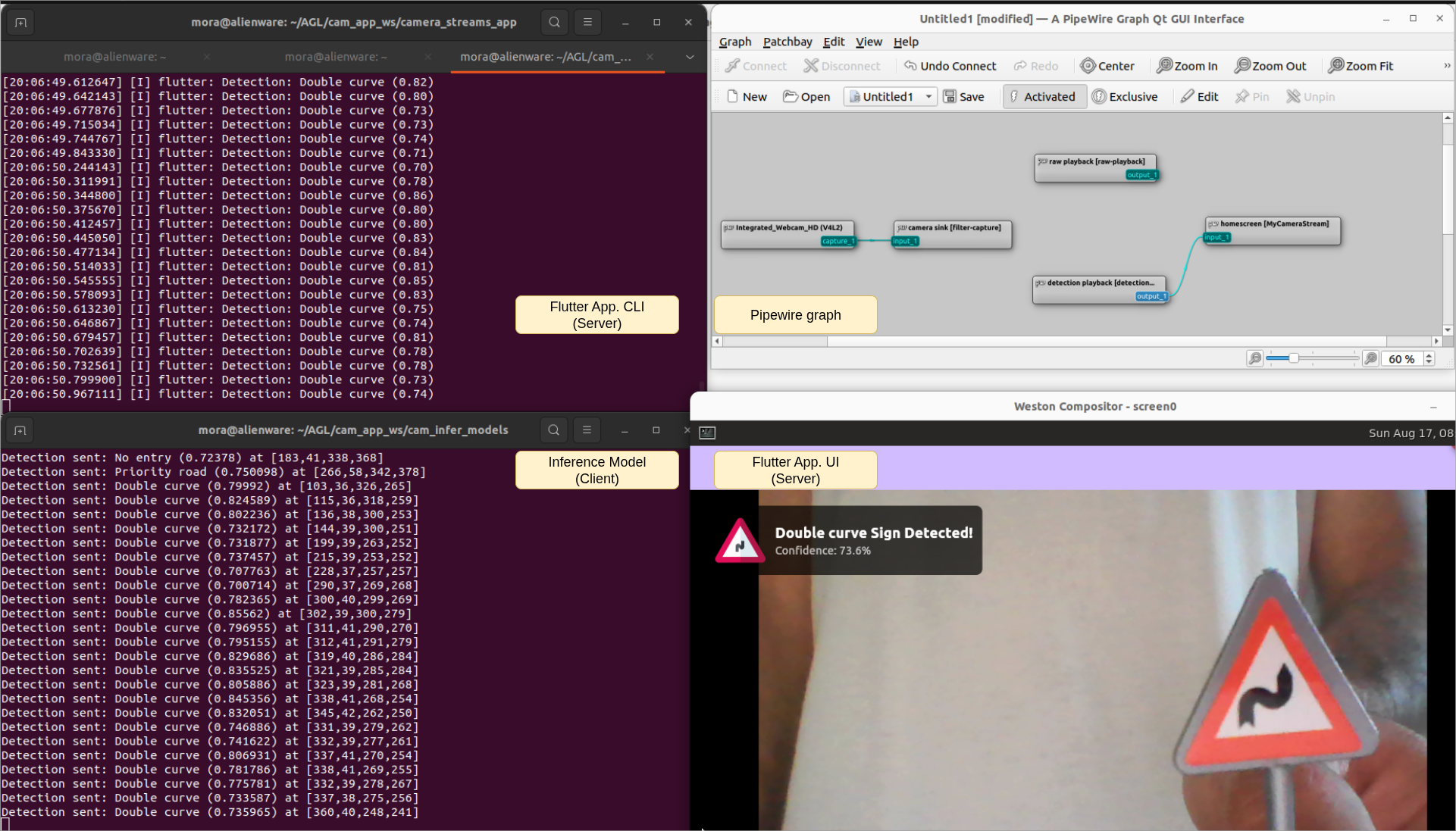
For now, only one mode (inference model) is working reliably and PipeWire streams are manually connected using qpwgraph.
Sample detection of the Double Curve traffic sign is shown below:
Next steps
- Retrain the current inference model to improve performance
- Add a model-switching feature, using a dropdown in the Flutter app.
- Automate the PipeWire connections using function calls