GSoC 2025 - Week 07 Status Update
Week 7 progress
This week I worked on using the FFI calls, which has a manually generated bindings of the ffigen package (without the hooks library), and I also had began working with the NanoPC-T6 hardware.
FFI
I successfully made some Flutter calls, after generating bindings with the following command:
$ dart run ffigen --config config.yamlInside the pipewire_bindings.dart, I noticed that some PipeWire functions were missing. This issue is related to warnings that appeared during the C bindings generation process. A section of the log shows:
[WARNING]: Skipped Function 'pw_core_errorv', inline functions are not supported.
[WARNING]: Skipped Function 'pw_core_errorf', inline functions are not supported.
[WARNING]: Skipped Function 'pw_core_get_registry', inline functions are not supported.
[WARNING]: Skipped Function 'pw_core_create_object', inline functions are not supported.
[WARNING]: Skipped Function 'pw_registry_bind', inline functions are not supported.
For example, one of the missing functions is pw_core_get_registry, which is essential to run the Flutter example application that interacts with PipeWire devices. So far, the current application successfully connects to the PipeWire core:
$ flutter run -d linux
Launching lib/main.dart on Linux in debug mode...
Building Linux application...
✓ Built build/linux/x64/debug/bundle/camstream_nodes
Starting PipeWire initialization...
Dynamic library loaded.
PipeWire functions loaded.
PipeWire initialized, result: 0
Main loop created: Pointer: address=0x730d14675720
About to create context...
Context pointer: Pointer: address=0x730d14674110
Connected to PipeWire, result: 342375744
Syncing files to device Linux...                                    50ms
NanoPC-T6
I connected the MCAM400 camera to the MIPI-CSI1 port and accessed the board via SSH. I attempted to verify whether the camera was listed as a device:
pi@NanoPC-T6:~$ v4l2-ctl --list-devices
rk_hdmirx (fdee0000.hdmirx-controller):
	/dev/video0
Only the HDMI input port was listed, indicating that the device tree might need to be modified. Before modifying the device tree, I checked whether the current kernel includes the driver for the OV4689 CameraChip sensor:
pi@NanoPC-T6:~$ modinfo ov4689
modinfo: ERROR: Module ov4689 not found.
pi@NanoPC-T6:~$ ls /lib/modules/$(uname -r)/kernel/drivers/media/i2c
imx415.ko
It turned out that only the HDMI input driver is present.
Next, I tried to check for data activity on the I2C bus, which I suspected to be the one connected to the camera:
pi@NanoPC-T6:~$ sudo i2cdump -y 10 0x50
No size specified (using byte-data access)
     0  1  2  3  4  5  6  7  8  9  a  b  c  d  e  f    0123456789abcdef
00: 00 ff ff ff ff ff ff 00 1e 6d c9 5b 01 01 01 01    ........?m?[????
10: 01 1f 01 03 80 30 1b 78 ea 31 35 a5 55 4e a1 26    ?????0?x?15?UN?&
20: 0c 50 54 a5 4b 00 71 4f 81 80 95 00 b3 00 a9 c0    ?PT?K.qO???.?.??
30: 81 00 81 c0 90 40 2a 44 80 a0 70 38 27 40 30 20    ?.???@*D??p8'@0
40: 35 00 e0 0e 11 00 00 1e 02 3a 80 18 71 38 2d 40    5.???..??:??q8-@
50: 58 2c 45 00 e0 0e 11 00 00 1e 00 00 00 fd 00 38    X,E.???..?...?.8
60: 4b 1e 55 12 00 0a 20 20 20 20 20 20 00 00 00 fc    K?U?.?      ...?
70: 00 4c 47 20 46 48 44 0a 20 20 20 20 20 20 01 bf    .LG FHD?      ??
80: 02 03 1b f1 48 90 04 03 01 10 12 13 1f 23 09 07    ????H????????#??
90: 07 83 01 00 00 65 03 0c 00 10 00 02 3a 80 18 71    ???..e??.?.?:??q
a0: 38 2d 40 58 2c 45 00 e0 0e 11 00 00 1e 00 00 00    8-@X,E.???..?...
b0: 00 00 00 00 00 00 00 00 00 00 00 00 00 00 00 01    ...............?
c0: 1d 00 72 51 d0 1e 20 6e 28 55 00 e0 0e 11 00 00    ?.rQ?? n(U.???..
d0: 1e 8c 0a d0 8a 20 e0 2d 10 10 3e 96 00 e0 0e 11    ????? ?-??>?.???
e0: 00 00 18 00 00 00 ff 00 00 00 00 00 00 00 00 00    ..?.............
f0: 00 00 00 00 00 00 00 00 00 00 00 00 00 00 00 8b    ...............?
I attempted to import the OV4689 driver from the rockchip-linux/kernel/develop-5.10/drivers/media/i2c/ov4689.c repository. However,
installation failed due to due to a kernel version mismatch (Nano-PC is running Ubuntu 22 with the 5.10.160 kernel). Below is a snapshot of menuconfig during camera sensor driver installation:
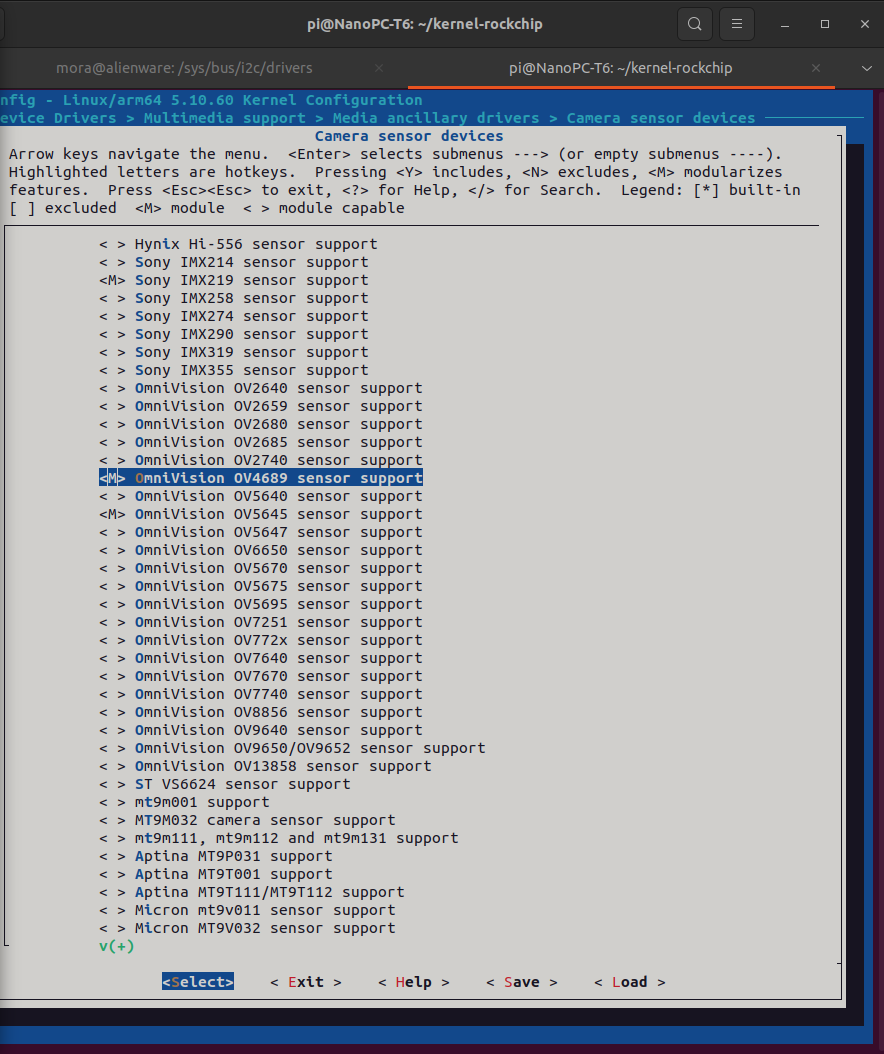
Debian image
I also tried to flash a new OS to eMMC via USB as decribed in friendlyelec wiki, using the RKDevtool (which supports the Rockchip-based devices), however, the flashing failed:
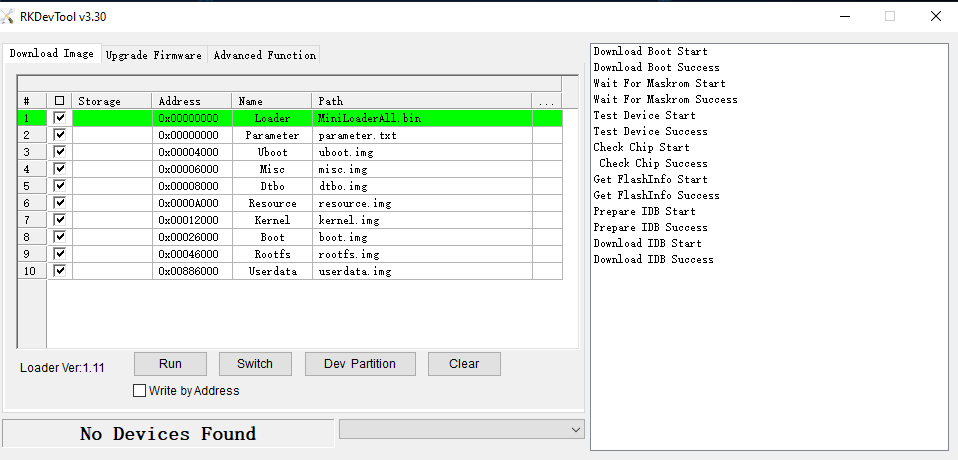
Some of the error logs are:
19:34:46 787	Error:LoadFwProc-->create image object failed,ret=-5!
19:37:02 627	Error:RKU_Write-->WriteFile failed,bRet=0,err=31,size=31,write=0
19:37:09 649	ERROR:RKU_ResetPipe-->DeviceIoControl failed,err=121
19:37:09 649	Error:ReadFlashIDProc-->RKU_ReadFlashInfo failed,err=-3
19:37:17 363	Error:RKU_Write-->WriteFile failed,bRet=0,err=995,size=31,write=0
I suspect the issue may be due to insufficient power supply as the board was only receiving 0.5A.
Next Steps
- Resolve the issue of missing FFI functions.
- Flash a new image and install OV4689 camera driver.