GSoC 2025 - Week 04 Status Update
Week 4 progress
This week, I created a PipeWire application template where the laptop Integrated_Webcam_HD camera stream is captured
by a sink node, which then copies it to two subsequent source nodes. These two source nodes represent the raw camera
stream and a Yolo detection-based processed stream, respectively. For the full application implementation, the source
nodes will be extended by one or two additional nodes.
PipeWire components
In order to capture the camera stream and forward it to other nodes, the PipeWire nodes are set up as:
- Camera sink node that receives the camera stream, defines and negotiates the required data format by the application, and forwards it to the next nodes. The stream of the sink node is defined as:
impl->capture = pw_stream_new(impl->core, "filter-capture",
  pw_properties_new(
    PW_KEY_MEDIA_TYPE, "Video",
    PW_KEY_MEDIA_CATEGORY, "Capture",
    PW_KEY_MEDIA_ROLE, "Camera",
    PW_KEY_NODE_DESCRIPTION, "camera sink",
  PW_KEY_MEDIA_CLASS, "Stream/Input/Video",
    PW_KEY_NODE_LINK_GROUP, link_group,
NULL));- Raw playback node serves as a proxy between the camera sink node and screen sink node, simply forwarding the raw data to the screen without any processing.
impl->raw_playback = pw_stream_new(impl->core, "raw-playback",
  pw_properties_new(
    PW_KEY_MEDIA_TYPE, "Video",
    PW_KEY_MEDIA_CATEGORY, "Playback",
    PW_KEY_MEDIA_ROLE, "Camera",
    PW_KEY_NODE_DESCRIPTION, "raw playback",
    PW_KEY_NODE_NAME, "camera-raw-output",
  PW_KEY_MEDIA_CLASS, "Stream/Output/Video",
    PW_KEY_NODE_LINK_GROUP, link_group,
NULL));- Detection playback node to be implemented, defined in the same way as the Raw playback node for now.
Running the example
To render the captured raw stream from the raw playback node, a GStreamer sink element is created:
$ gst-launch-1.0 pipewiresrc "stream-properties=p,node.autoconnect=false" ! glimagesinkAfter running the application, the resulting PipeWire graph appears as:
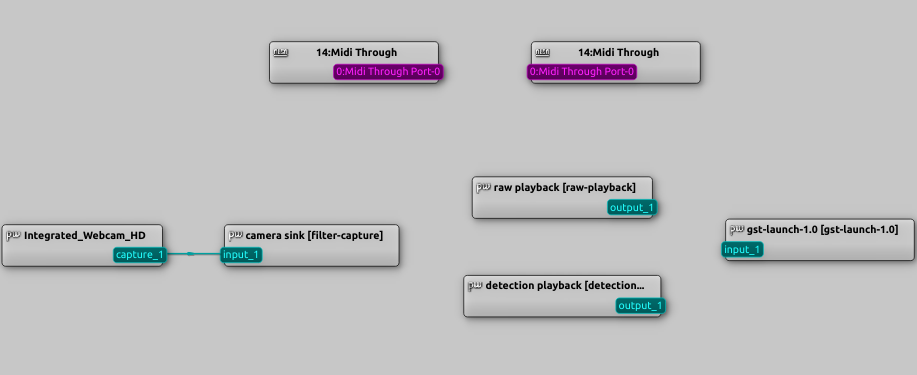
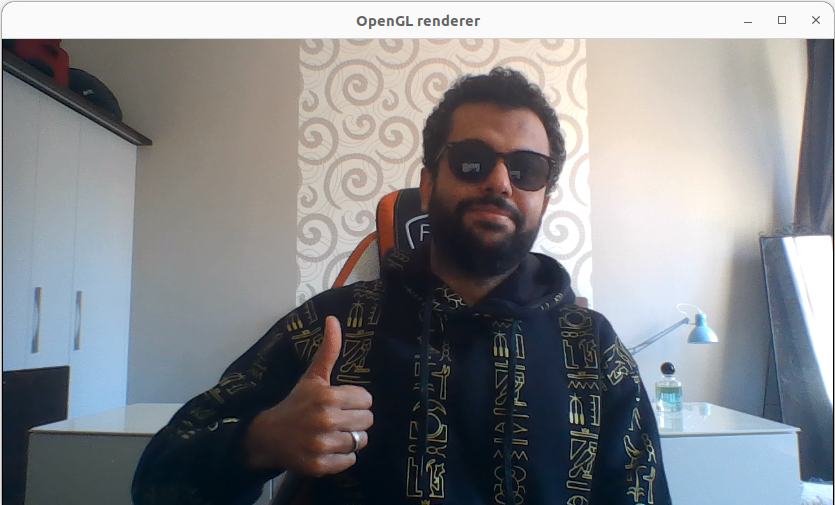
By manually connecting the raw playback to the gst-launch-1.0 in the qpwgraph, the camera stream is rendered:
Next steps
- Integrate the Yolo detection module into the
detection playbacknode. - Create a Flutter app to establish PipeWire stream connection(s) in realtime.