GSoC 2025 - Week 02 Status Update
Week 2 progress
This week, I began setting up the ivi-homescreen Flutter C++ embedder, in order to run the camera_linux
example app.
Following the CI Jobs of workflows/ivi-homescreen.yaml, the ivi-homescreen embedder was built using:
$ cmake .. -DCMAKE_BUILD_TYPE=Debug \
-DPLUGINS_DIR=`pwd`/../ivi-homescreen-plugins/plugins \
-DBUILD_PLUGIN_CAMERA_PIPEWIRE=ON \
-DBUILD_PLUGIN_VIDEO_PLAYER_LINUX=ON \
-DDEBUG_PLATFORM_MESSAGES=ON
The Flutter workspace was set with pipewire flag and the camera_linux example application was run as follows:
$ flutter_workspace.py --flutter-version=3.27.1 --enable=pipewire
$ source setup_env.sh
$ cd /path/to/camera_linux/example
$ flutter run -d desktop-homescreen
I re-checked the resulting PipeWire connections after launching the example:
$ wpctl status
└─ Streams:
40. homescreen
    41. input_1         < Integrated_Webcam_HD:capture_1	[active]
46. cheese
    47. input_1
I also reviewed the connections between the integrated webcam and homescreen or cheese using qpwgraph:
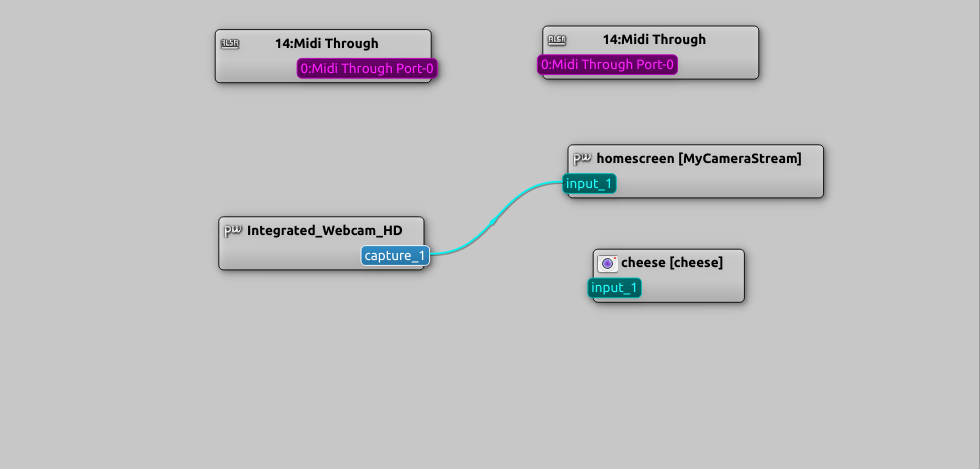
I started exploring the code of camera_linux plugin and example application camera_linux/example
Next steps
- Continue the exploration of the
camera_linux/example - Create a sandbox environment for sample application testing and understanding the underlying API of
camera_linux